Best Reading Apps for Dyslexia in 2026 (Expert-Reviewed Guide)

Reading with dyslexia is not just about hearing text out loud. It is about how text is presented, how the brain processes it, and how comprehension is supported in real time.
Most reading apps still treat dyslexia as a text-to-speech problem. Research and lived experience show that this approach is incomplete.
In 2026, the best reading apps for dyslexia combine visual accessibility, customizable typography, reading focus tools, and increasingly, AI-powered comprehension support. This guide reviews the best mobile reading apps for dyslexia in 2026, explains what actually helps dyslexic readers, and compares the leading apps based on evidence, not marketing claims.
What Makes a Reading App Dyslexia-Friendly?
Before comparing apps, it is important to define what matters. Based on academic research, assistive technology studies, and real-world usage, effective dyslexia reading apps consistently support the following:
1. Deep Text Customization
There is no universal “best font” for dyslexia. Readers benefit from being able to adjust:
- Font type (including dyslexia-friendly fonts)
- Font size
- Line height
- Letter spacing
- Background and text contrast
Studies show that personalized typography can significantly improve reading speed and comfort without harming comprehension.
2. Visual Reading Support, Not Just Audio
Text-to-speech alone is insufficient for many dyslexic readers. The best apps also provide:
- Word or sentence highlighting
- Reading rulers or focus modes
- Clean, distraction-free reading layouts
These features reduce cognitive load and help readers track text more effectively.
3. Real Comprehension Assistance
Reading aloud does not guarantee understanding. Advanced dyslexia apps now include:
- Built-in word definitions
- Simplified summaries of complex text
- Tools that break down difficult passages
This shift from “listening” to understanding is critical.
4. Accessibility-First Design
Apps designed specifically for dyslexia perform better than generic readers with accessibility add-ons. Accessibility-first apps:
- Reflow text into optimized layouts
- Avoid clutter and unnecessary UI choices
- Apply reading settings consistently across the app
5. Support for PDFs, Documents, and Scanned Text
Dyslexic readers encounter text everywhere. The best apps handle:
- PDFs and Word documents
- Web articles
- Photos of printed pages
- Scanned textbooks and worksheets
OCR quality and offline support matter more than most people realize.
Best Reading Apps for Dyslexia in 2026
DyslexiaBuddy
Best Overall Dyslexia Reading App
DyslexiaBuddy stands out because it is built specifically around how dyslexic readers process text, not around narration. It combines typography control, visual reading support, and AI-powered comprehension tools into a single workflow.
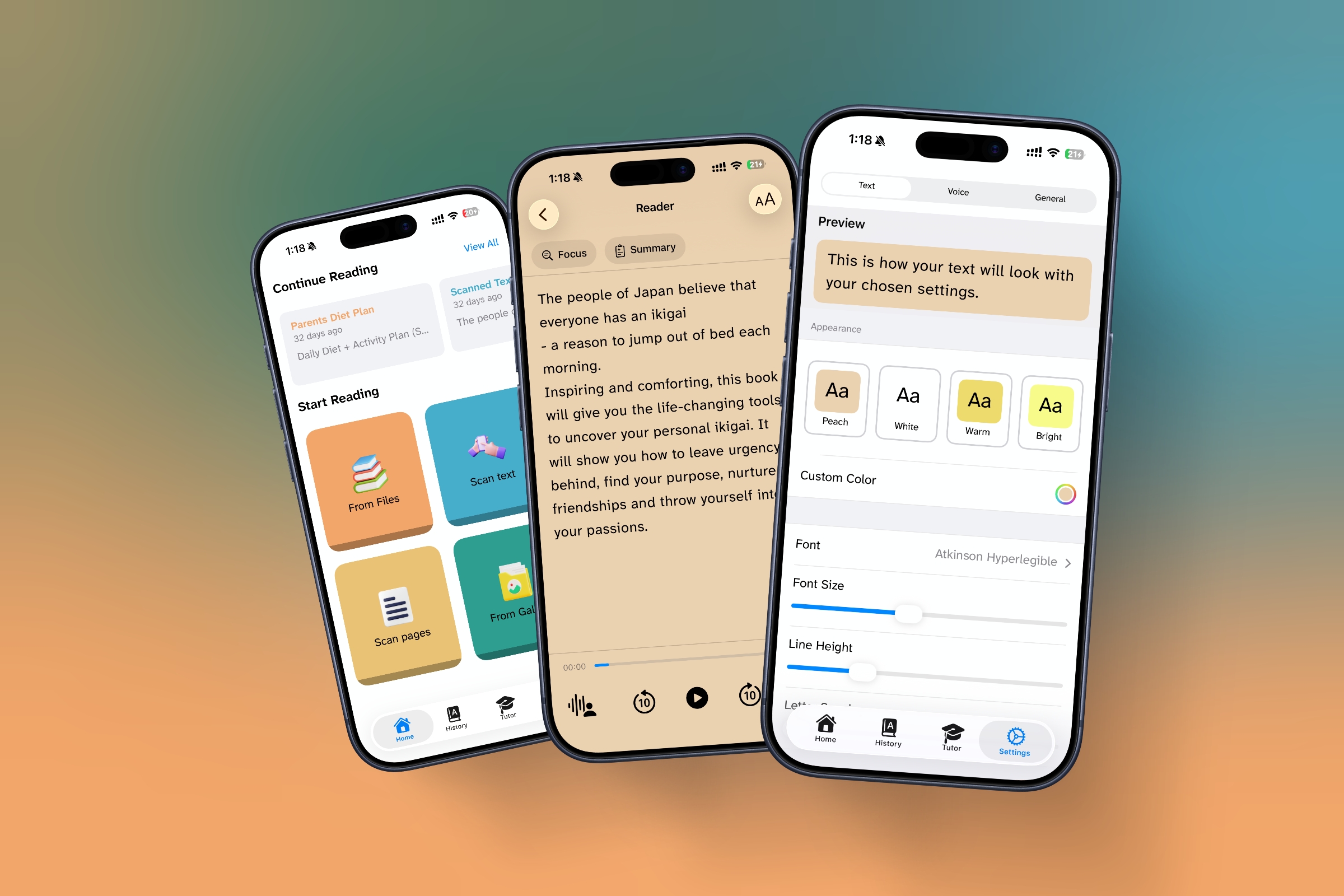
Key strengths:
- Fully customizable reading display (font, spacing, colors)
- Clean, distraction-free reader for PDFs and documents
- Offline OCR scanning for books, worksheets, and handwriting
- AI reading tutor that explains, summarizes, and simplifies text
- On-device voices for privacy and speed
What differentiates DyslexiaBuddy is its AI tutor. Users can ask questions about what they are reading, request simpler explanations, or generate summaries instantly. This directly addresses one of the biggest gaps in dyslexia tools: comprehension.
Unlike many competitors, DyslexiaBuddy is designed to help users read with understanding, not just consume audio.
Best for: Students, professionals, and adults with dyslexia who struggle with comprehension, not just decoding words.
Voice Dream Reader
Best for File Support and Customization Without AI
Voice Dream Reader has long been a favorite in the dyslexia community due to its flexibility.
Strengths:
- Extensive font, spacing, and color customization
- Supports nearly every file format
- Strong word highlighting synced with audio
- One-time purchase option
Limitations:
- No AI tutor or comprehension assistant
- Interface feels dated compared to newer apps
Voice Dream is excellent for users who want control and compatibility, but it stops short of offering deeper reading support.
Speechify
Best for High-Quality Voice Narration
Speechify is widely known for its natural-sounding voices and ease of use.
Strengths:
- Excellent audio quality
- Fast conversion of text to speech
- Works across web, mobile, and documents
- Recently added AI summaries and Q&A features
Limitations:
- Limited visual customization compared to dyslexia-first apps
- Primarily optimized for listening, not visual reading
- Accessibility features feel layered on rather than foundational
Speechify works well for users who prefer audio-first consumption. For dyslexic readers who need visual and comprehension support, it can feel incomplete.
Omoguru Lexie
Best for Children and Structured Reading Support
Lexie focuses heavily on visual decoding support for children with dyslexia.
Strengths:
- Advanced font and spacing personalization
- Syllable highlighting and guided reading line
- Strong OCR scanning for textbooks
- Designed with educators and specialists
Limitations:
- No AI-based comprehension tools
- Less suitable for adult or professional reading
Lexie excels at helping young readers improve accuracy and confidence, but it is not designed for complex adult reading tasks.
Leksa
Best for Quick Camera-Based Reading
Leksa is optimized for turning photos of text into readable content quickly.
Strengths:
- Fast OCR from photos
- Clean, dyslexia-friendly layout
- Simple, focused experience
Limitations:
- Limited customization
- No AI or advanced reading tools
- Best for short text, not long documents
Leksa works well for everyday reading tasks like signs or worksheets, but it is not a full reading ecosystem.
Feature Comparison Focused on DyslexiaBuddy’s Strengths
| Feature | DyslexiaBuddy | Voice Dream | Speechify | Lexie | Leksa |
|---|---|---|---|---|---|
| Deep font and layout customization | Yes | Yes | Partial | Yes | Partial |
| Distraction-free reading mode | Yes | Yes | Partial | Yes | Yes |
| AI comprehension support | Yes | No | Partial | No | No |
| Built-in summaries and explanations | Yes | No | Yes | No | No |
| Offline OCR scanning | Yes | Partial | No | Yes | Yes |
| Designed specifically for dyslexia | Yes | Yes | No | Yes | Yes |
Which App Should You Choose?
- Choose DyslexiaBuddy if comprehension is your biggest challenge.
- Choose Voice Dream Reader if you need broad file support and customization without AI.
- Choose Speechify if you primarily want to listen.
- Choose Lexie if you are supporting a child with dyslexia.
- Choose Leksa for quick, on-the-go reading from photos.
Final Verdict
Most reading apps were not designed for dyslexia. They were adapted for it.
DyslexiaBuddy is part of a newer generation of tools that treat dyslexia as a reading and comprehension difference, not just a pronunciation issue.
By combining dyslexia-friendly typography, distraction-free reading modes, and AI-powered understanding, DyslexiaBuddy sets a new standard for what a dyslexia reading app should be in 2026.
If your goal is not just to hear text, but to actually understand it, the difference is obvious.
Try the Best All-in-One Solution
Experience why thousands of families trust DyslexiaBuddy for reading success. Scan, listen, and learn with your own AI tutor today.
Download DyslexiaBuddy Free